



How to Change Home Screen Icons Individually
UPDATE: 2025.03.17
+HOME is an Android customization app that allows you to personalize your smartphone.
This article introduces how to individually customize icons on your home screen.
▼How to Change Icons to Another Theme
1. Download the theme with the icons you want to use
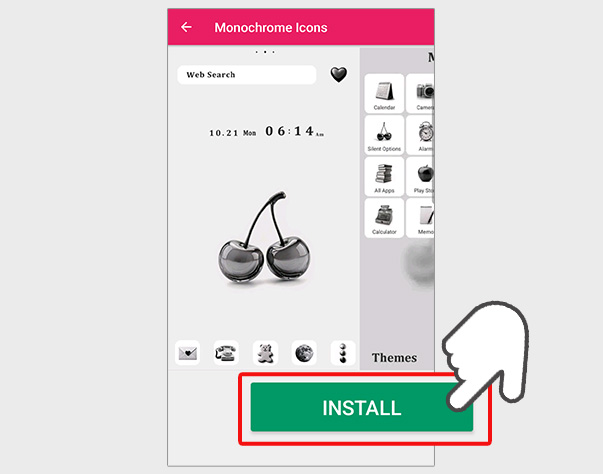
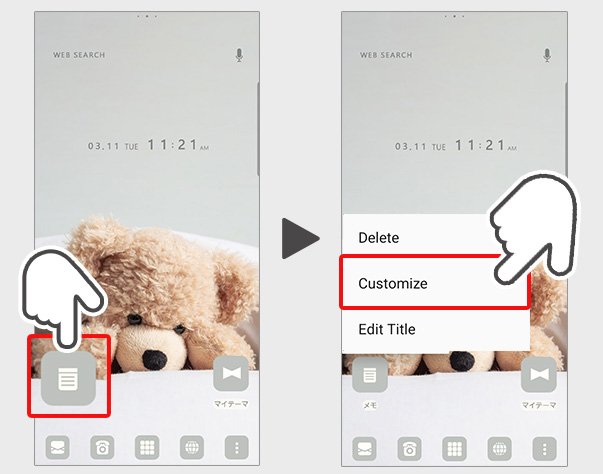
2. Long-press the icon you want to customize on the home screen
3. Select 'Customize' from the displayed menu
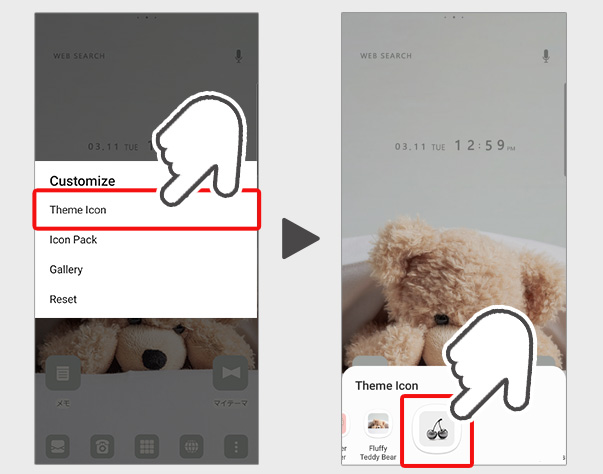
4. Select 'Theme Icons' from the displayed menu
5. Select the theme you want to customize from the theme icons
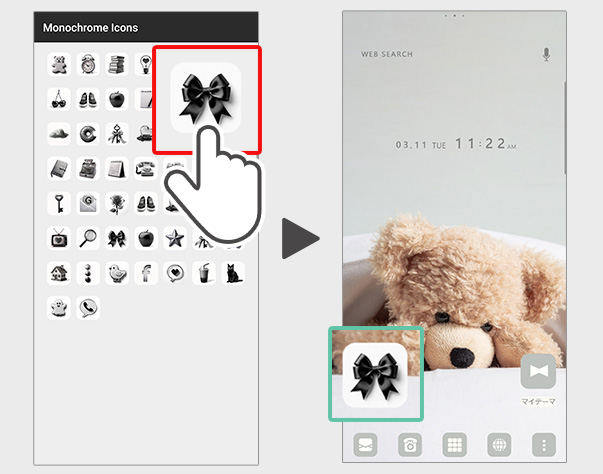
6. Select your favorite design from the list of icon designs
\Customization Complete!/
▼How to Restore Icons
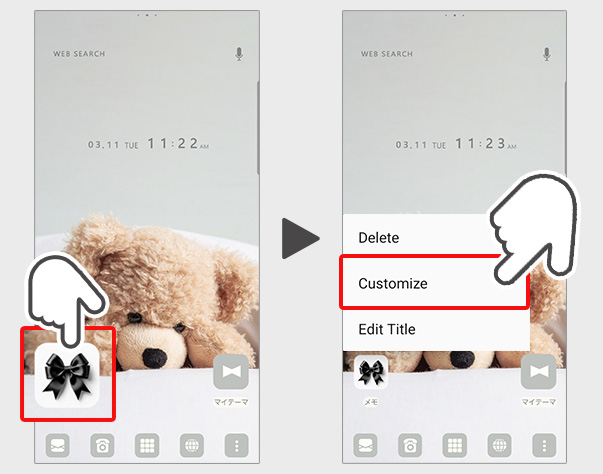
1. Long-press the icon you want to customize on the home screen
2. Select 'Customize' from the displayed menu
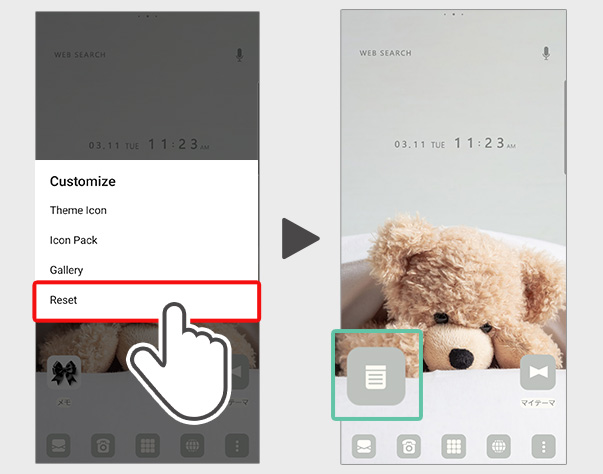
3. Select 'Reset' from the displayed menu
4. The icon has been restored to its original state
Introducing the themes I used for customization♪
Fluffy Teddy Bear


A teddy bear theme with soothing colors.

Monochrome Icons


A simple theme featuring a cherry background.
List of How to Use +HOME
-
About the Home Screen
-
Let's Change the Theme
-
How to Use the Drawer (App List)
-
Mastering the Home Screen
-
About the Iconpacks
-
How to Change Home Screen Icons Individually
-
How to Change Home Screen Icons All at Once
-
How to Change Home Screen Icons with Your Favorite Images
-
How to change home screen icon size
+HOME Special Features List.
-
🌞 Fresh early summer theme special. 🌿
Enjoy ✨ before the rainy season begins! A collection of themes with fresh designs of forests and flowers, inspired by the fresh breeze of early summer. ☺️
-
☕ Cozy Special ☕
Relaxation time you can feel on your phone! A variety of stylish and relaxing designs!
-
🍘 Japanese Sweets & Japanese-Style Theme Special 🍘
Admire Japan's traditions on your smartphone. Get an elegant screen adorned with the seasonal charm and lovely colors of Japanese sweets and motifs right now! 🍘
-
⭐ Y2K Theme Special Feature ⭐
Take a trip back to the 2000s on your smartphone screen! Feel nostalgic and refreshed with the Y2K theme⭐
-
🌼 Mimosa and Spring Theme Special Feature 🌼
A golden glow of happiness spreads across your screen! Transform your smartphone into a soothing sanctuary of gentle, warm colors with this mimosa and spring blossom-inspired theme🌼
-
🦋 Butterfly Special 🦋
Featuring elegant butterfly motifs for your smartphone standby! Stylish your phone with heartwarming designs!
-
☎ Recommended Themes for Model Changes Special ☎
The best for your new phone! Selected easy-to-use Kisekae themes recommended when changing to a Google Pixel or Galaxy phone!
-
🦄 Cute Unicorn Theme Special Feature 🦄
Unicorns brighten up your smartphone screen! Feel like you're in a fantasy world with these colorful themes🌈
-
🎆 Fireworks and End of Summer Theme Special 🎆
Would you like to enjoy beautiful moments of fireworks that color the end of summer on your device? We have prepared special wallpapers, skins, and themes for free! With enchanting fireworks designs, you can always look back on your summer memories.
-
🍎 Lucky Charm Theme Special 🍀
Transform your screen into a positive space using cute avocado and lucky charm charm wallpapers🥑
-
🍀 Featured clover for good luck 🍀
Grab good luck! Why not add a little surprise to your daily life with a smartphone Kisekae theme with a clover motif?
-
🍎 Cute Apples Special 🍎
Decorate your phone with apple cuteness! Featuring recommended Kisekae designs!
-
🌊 Calm Sea Theme Special Feature 🌊
Bring the peace of the seaside to your smartphone! Enjoy the gentle waves and shining sunset with this customizable theme💙
-
🌸 Night Cherry Blossom Special 🌸
Make your smartphone standby gorgeous with enchanting nighttime cherry blossoms! Make your daily life beautiful with fantastic designs!
-
★ Chic Wallpaper Collection for Popular Guys ★
Create the perfect smartphone for the popular guy! Get a cool screen with night highway and smoke themes! ✨
-
🕯️ Spooky Halloween Theme Special 🎃
Enjoy a spooky night on your smartphone! Create horror and dark screens with Halloween theme packs 🎃
-
⛱️ Starry Sky Theme Special ⛱️
Transform your phone into a starry night universe with customized space aesthetic themes right now!:star:️
-
🌊Summer Sea Theme Special🌊
Decorate your smartphone with beach scenes that feel like summer! We bring you a Kisekae theme feature that will make you feel the charm of the sea⛱️
-
💜 Cute Theme Special 💜
Exceptional healing effects! We have lots of adorable themes featuring cats, dogs, trending winter bunting (shima enaga), and seals! With fun smartphone designs, brighten your spirits and enjoy your relaxation time with your favorite illustrations!
-
🍣 Sushi and Japanese Sweets Theme Feature 🍵
Add delicious magic to your smartphone screen! With this Japanese gourmet design theme, enjoy a thrilling visual experience that makes your stomach rumble every time you look at it🍣😋